Chrome extension · live in the store
Select text anywhere — get a real source
A purple bubble appears whenever you select text on any page. One click — and you have a verified academic publication with a printed page number, a quote and a ready-to-copy footnote.
Free extension · 100 citations a month, no card · one account works across every cytado channel.
Works where you read and write
Any page
Notes in Notion, an article, your university platform's editor, Word online — the bubble appears wherever text can be selected.
Zero invented sources
Only existing publications with a link, a printed page and a quote; no coverage means an honest “not found”.
Browsing privacy
cytado receives only what you select and click — never page content, never your browsing history.
See it in the Chrome Web Store
This is the exact screenshot shown on the official store listing — a real result from the panel, not an illustration.
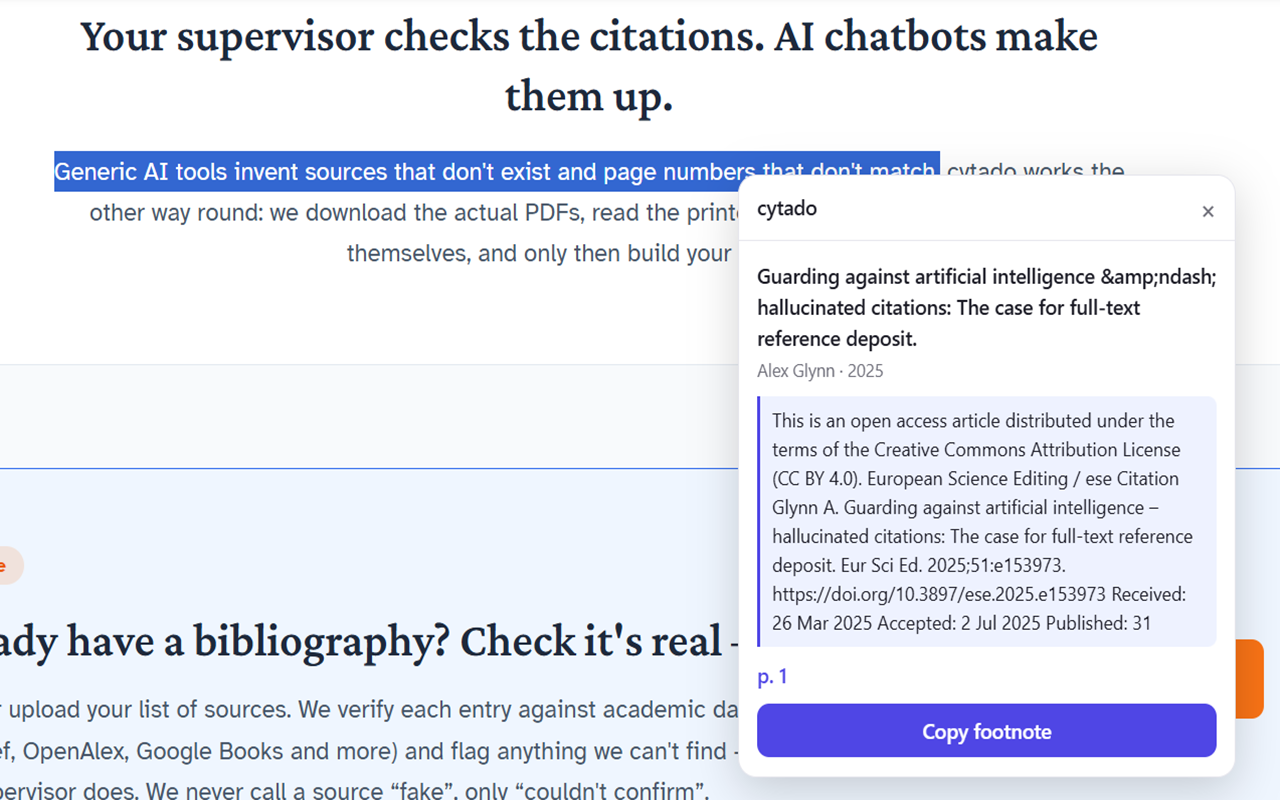
cytado — real sources & footnotes
Extension · Education · 16 KB · one-click install, no Google account required.
Brand new in the store: no ratings yet. Check the listing and judge for yourself.
Sound familiar?
You're reading an article, a note, a PDF — you hit a sentence you want to reference in your own work. New tab, type a phrase into Google Scholar, scroll through ten results, none quite fits, and eventually you give up or grab something close enough. Fifteen minutes later, one sentence down.
The AI shortcut is worse: a chatbot hands you a citation that sounds flawless and doesn't exist. One fabricated reference undermines the whole paper once a supervisor or reviewer checks it.
With the extension, the same moment is:
- 1. Select the sentence right where you're reading it.
- 2. Click the purple bubble — a few seconds.
- 3. See the source, the page and the quote. Copy the footnote.
You never leave the tab you're reading — the panel opens right next to your selection.
Install and first sign-in (2 minutes)
Nothing to buy, nothing to configure. The extension and the cytado account are free.
- 1
Add it to Chrome
Click “Add to Chrome” on the Chrome Web Store page and confirm in the popup. The extension is 16 KB — it installs in a couple of seconds, no browser restart.
- 2
Select a sentence on any page
An article, a Notion note, a PDF open in the browser, Word for the web — wherever text can be selected, selecting at least a full sentence brings up a purple bubble with a “c”.
- 3
Click the bubble and sign in (once)
A panel opens. The first time, click “Sign in with cytado” — log in (or create a free account in half a minute, no card) and click “Allow”. The token is stored locally in the extension; you won't need to sign in again.
- 4
See the source and copy the footnote
The panel returns a verified publication with a printed page number and a quote from that page. One click on “Copy footnote” puts a ready footnote on your clipboard — paste it back wherever you're writing.
How signing in and authorizing works
The extension never asks for your cytado password in its own window. Clicking “Sign in with cytado” opens the real cytado.com sign-in page in a standard browser window (OAuth with PKCE — the same mechanism Google or Slack use). You log in as usual, click “Allow”, the window closes.
The access token is stored only in the extension's local storage (chrome.storage) — no page you visit can reach it. The session refreshes itself automatically; you only sign in again after manually logging out or revoking access in the panel.
Step by step
- 1. The bubble's panel shows “Sign in with cytado”.
- 2. cytado.com opens — you log in or create an account.
- 3. You click “Allow” on the consent screen.
- 4. You're back at your selection — the panel retries the search on its own.
The same account also works in the Word add-in, the Google Docs add-on and the MCP connector — you sign in once per device/browser, not once per channel.
What people use it for
Reading a source before you cite it
An article, a PDF, a university page — select the passage you want to reference and immediately see whether a publication supports it, from which page, with which quote.
Writing with AI assistance and checking claims
A chatbot suggested a sentence for your paragraph but gave no source — or gave one that doesn't exist. Select the sentence and check it before it goes into your paper.
Research spread across dozens of tabs
Notion, Google Scholar, a digital library, articles in three languages — the bubble works everywhere you'd normally copy fragments into a separate notes document.
Working in Word for the web and on university platforms
Plagiarism checkers and university course sites rarely ship their own add-ins — the extension works regardless of which web editor you happen to be in.
How billing works
The extension and the account are free. The free pool is 100 resolved citations a month — no card required, it renews every month. Resolved means: the panel found and returned a source. When nothing supports the selected sentence, you get an honest “not found” — and that is always free, no matter how often it happens.
When the pool runs out, paid plans start at $19/month. Payment (by card, via Stripe) happens in the cytado.com panel — the extension itself never charges anything. Every channel (the extension, Word, Google Docs, MCP, the panel) shares one pool on the account, so your bill is never surprised by a double charge.
Writing with AI assistance?
The same account also works as an MCP connector for Claude and ChatGPT — your assistant grounds claims in real sources before writing them down, instead of inventing footnotes.
FAQ
Does the extension read the pages I browse?
No. The script on the page only listens for text selection — cytado receives only the fragment you explicitly select and submit via the bubble. No other page content, and never your browsing history, ever leaves your browser.
Does it work in Google Docs?
Google Docs draws text on canvas, so no extension can read a selection there — that's a limit of every Chrome extension, not just ours. That's why we have a dedicated Google Docs add-on that works from the inside and inserts real footnotes; the extension will point you to it the moment you land on docs.google.com.
How do I know the sources are real?
Every result is an existing publication with a link to the original (DOI or URL), a printed page number and a quote from that exact page. We read publications page by page, preserving the edition's original numbering. When nothing supports the selected sentence, the panel says so directly — it never guesses.
What does “Offers in-app purchases” mean on the Chrome Web Store listing?
That's Google's standard label for any extension that links to a paid plan — the extension itself never sells anything or charges a card. Payment, if it ever happens, runs through Stripe in the cytado.com panel, not inside the extension.
How much does it cost?
The extension and the account are free. The free pool is 100 resolved citations a month, no card required — usually enough for a single paper. Paid plans start at $19/month. You pay only for citations you actually received: a “not found” is always free.
Is the extension's pool separate from other channels?
No — one cytado account has one shared pool across every channel: the Chrome extension, the Word add-in, the Google Docs add-on, the MCP connector and the panel. A citation counted in one channel is not counted again in another.
How do I revoke access?
In the cytado panel (Account → API) deactivate the “Chrome extension” key — the extension loses access immediately. You can also simply remove the extension from Chrome (chrome://extensions).